Cutting agency project delays with better design handoff
Design handoff gaps, not design or code, cause most agency delays. Here's how Concealed eliminated back-and-forth with better Figma documentation.
- UX/UI Design
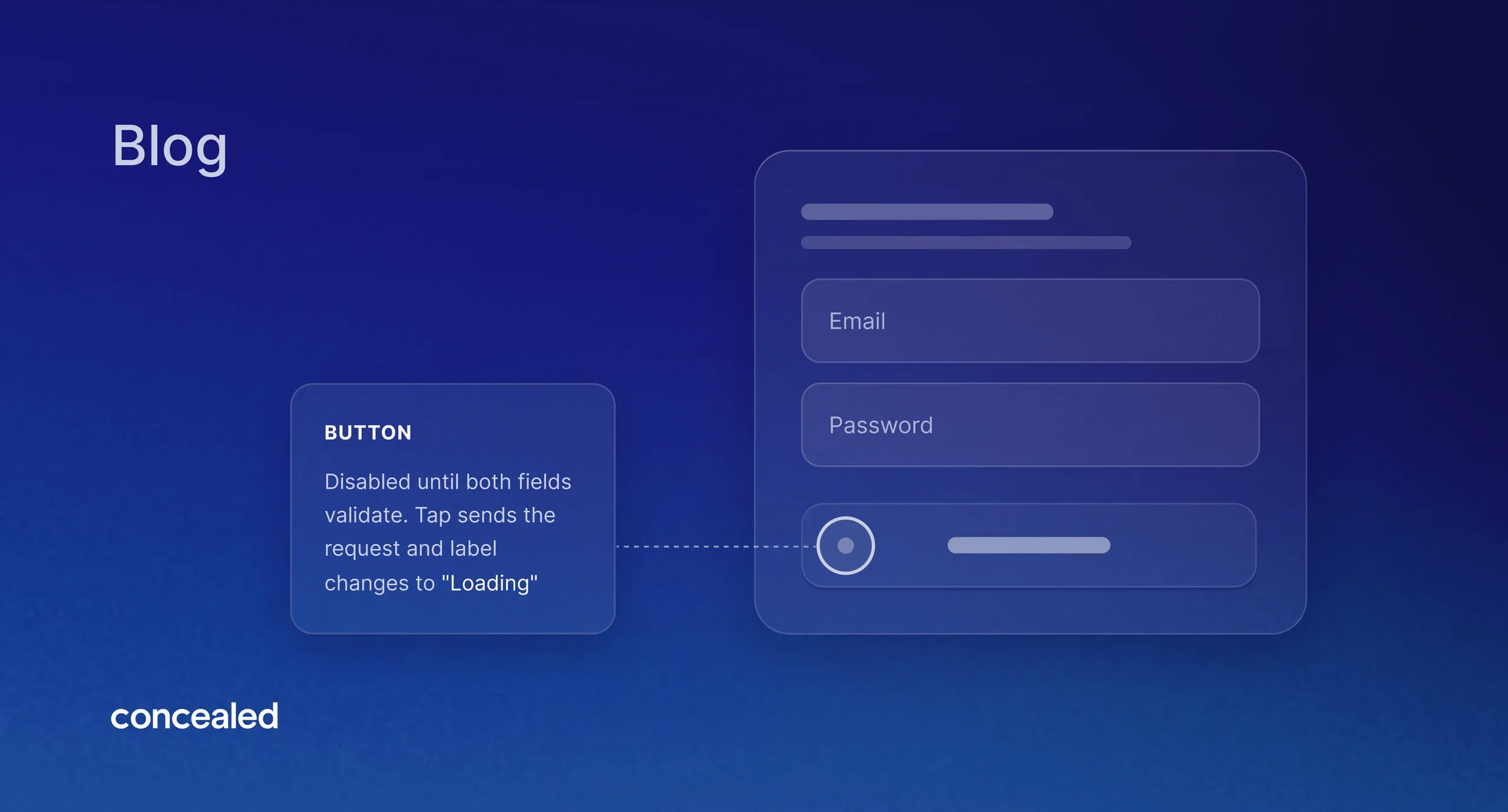

The delays that slow down agency projects rarely come from the design or the code, they come from the pauses in between. A developer unsure how an edge case should behave. A Product Manager who doesn't know what triggers an error state. Each question waits on a reply, and on a remote, async team those pauses stack up fast. At Concealed, we eliminated most of them by doing one thing: writing more detailed notes directly onto the Figma canvas, attached to the specific frames that needed them.
Where the delays actually come from
Even when design and development work is done diligently, clients are responsive and provide timely feedback, agency projects can sometimes take longer than anticipated. As a UX/UI Designer working directly with clients and within client context, I noticed early on a pattern emerging: even though we had full flows mapped out and properly labeled, with prototypes for mobile apps and dashboards complete and detailed, developers and stakeholders would reach out with various questions on how the product was supposed to behave.
I then realized that part of the problem didn't necessarily lie in the design work or code itself, but in the pause in-between: when a developer checks designs in Figma and isn't sure why a button behaves a certain way; or when a Product Manager doesn't understand the conditions that lead to an error state, and they have to stop and ask. It makes sense for them to ask for further clarification. After all, digital products are systems full of conditions, and understanding all their states and flows is crucial to understanding the actual product itself.
It made it clear that improving the handoff is key to avoiding delays with a design agency. What changed things wasn't a new tool or a completely new process, but a major and simple improvement on our deliverables: writing more notes directly onto the Figma canvas.
What actually goes into a handoff note
Good documentation is essential for understanding the full context of a specific feature or product, but that should be the baseline for any mature digital product. What truly improved clarity across the board were smaller handoff notes tied to specific frames or components, to describe what a static screen can't communicate no matter how clean it looks. I started adding more notes concerning:
States
Error, empty, loading, disabled, and other product-specific states. Each one shown with frames and shortly described by notes, not assumed. The same screen can have multiple variations that need to be clear to everyone working on the project.
Content truncation rules
What happens when a title is longer than the design assumed, wether it wraps or pushes adjacent elements. This matters even more once real content (not placeholder text) hits the screen.
Responsiveness edge cases
Minimum and maximum widths and heights. What a container does when it hits its limit, on the smallest supported screen and the largest.
Interaction and conditional behavior
What has to be true for a button to move from disabled to enabled. What triggers an actual request to the system versus what's just local state. What happens on invalid input. Any requirement already defined for the feature that's useful to show in context gets added here too.
Design changes
Unavoidable in iterative projects, where adding new functionality impacts existing designs. Highlights major or minor changes, increasing awareness.
Questions
Iteration opportunities directed to stakeholders, or doubts about technical limitations or requirements aimed at developers and Product Managers.
Why this matters even more for an async, remote team
In a more conventional work environment, with a team sitting in the same room, a simple question gets answered by turning around and asking a colleague. But that's not how it works in a remote environment, especially with an async team like ours here at Concealed. A question that takes thirty seconds in person can, in a remote async environment, sit for half a day waiting for someone to see it, respond, and get the answer back to the person who needs it to keep moving. Multiply that across every small ambiguity in a set of designs, and it adds up to real, avoidable delay, not because anyone's slow, but because the information wasn't there when it was needed.
Having in-context handoff notes reduces that dependency drastically. The answer is already in the canvas, attached to a frame. The developer preparing to implement that screen, or the stakeholder reviewing that flow, has much more information to work with, directly where they are checking the designs. The client is always in the loop, and nobody has to wait on a reply to keep going.
What changed after we started
Shortly after I started attaching more notes directly to frames, the impact showed up in client team meetings, as questions from developers and stakeholders about how a certain design was supposed to behave dropped off noticeably to one or two questions per ticket.
The impact was also felt in async communications: questions about design behavior over direct messaging became virtually non-existent, and feedback grew more focused, with fewer iteration rounds before project completion.
What this means for your timeline and budget
Every clarifying question is a potential delay. Every round of "why is this button disabled in this screen?" has to wait on someone to read it and reply on their own timeline. Clarifying questions carry a cost too. Time spent reading a question and writing a reply is time pulled away from the project itself, and that time still has to be paid for by someone.
Detailed handoff notes are not just tidier documentation, they reduce costly revisions, and help avoid agency projects taking so long. Fewer clarification loops mean the project moves at the pace it was scoped for, and the price you agreed to stays the price you pay.
If clearer handoff and fewer delays sound like what your project needs, let's talk about your project.
Frequently Asked Questions
How do you avoid delays caused by miscommunication between design and development?
By putting the answers to likely questions directly where the work happens: notes on the Figma frame itself covering states, edge cases, conditions and interactions, plus detailed context on every ticket sent for review. The goal is that a developer or stakeholder never has to guess, or wait for someone to confirm what was intended.
Does clearer documentation lower project costs?
Indirectly, yes. Fewer clarifying questions mean fewer rounds of rework and fewer delays waiting on answers. That protects the agreed cost instead of quietly eating into it through avoidable back-and-forth.
How does Concealed prevent scope confusion between design and development?
By documenting the parts of a design that a static screen doesn't show on its own, hover and error states, content truncation rules, responsiveness limits, and the exact conditions that control when something appears, enables, or changes. That detail is preserved in design context, so intent doesn't get lost in translation.
Why do some agency projects take longer than expected?
Usually not because of the design or development work itself, but because of the pauses in between. A developer who's unsure how something should behave has to wait on an answer before they can keep going. On a remote or async team especially, those small pauses add up fast. Clear, detailed handoff is one of the more effective ways to remove them.
Do I need to be constantly available to keep a project moving?
No. Handoff notes answer most questions before they're asked, so the team can keep working without waiting on you for every edge case. You stay in the loop through the notes and the ticket context, not through being pulled into constant back-and-forth.
What happens when new requirements come up mid-project?
Design changes are expected in any iterative project. When they happen, they're flagged directly in the handoff notes as design changes, so everyone working on the build sees what changed and why, instead of finding out when something doesn't match what they expected.
Does documenting every edge case slow the design process down?
It shifts time from later to earlier. Writing a note about an error state or a responsive breakpoint takes a few minutes during design; answering the same question after development has started, over chat, with someone waiting on the reply, costs more. The upfront time pays for itself in avoided delays.
Will skipping the back-and-forth mean the final product is less thought through?
No, it's the opposite. The questions still get answered, just earlier and in writing, attached to the exact frame they apply to. Nothing gets built on an assumption, it's built on a documented decision.
Written by Leonardo Rodrigues, designer at Concealed — a Framer Expert studio based in Lisbon building fast, scalable websites and custom internal tools.