Why we’ve always built in components, and what it has saved one client over six years
Component-based architecture from the client’s side: how reusable components kept six years of changes to one app from ever needing a rebuild.
- Case Study
- Desktop App
- E-Commerce
- Frontend Development

The request that comes back as a rebuild
Most software projects have a “second act” that can’t be budgeted for initially. The product launches, the customers use it, and within a few months the client knows things they could not have known before, so understandably they ask for changes, such as a new way to pay, a filter that was not originally considered or another product type in the same shop. In many studios, the estimate that comes back is surprisingly high in the customers eyes, with the explanation that “it touches everything”.
That answer is usually honest because it describes how the software was built. If a product is written as a set of pages, each carrying its own copy of the logic it needs, then every change really does touch everything, and eventually someone proposes the rebuild. We have spent nine years working never to be in that position, and the way we do it is neither new nor clever. We build in components, from the first design file to the last line of code, and we have done so on every project since we started.
The simMarket desktop app, which we have built and maintained since 2020, is the example this post follows: in the six years since launch, the client asked for many new features such as a quick checkout, new filters on its Scenery Map and dozens of smaller changes: none of them came back as a rebuild.
What we mean by component-based architecture
For us the practice begins in design. A design system is a set of abstract reusable components (buttons, inputs, cards, tables, headers) and rules for how to combine them. When a designer changes the button in the system, every screen that uses it changes with it, and nobody has to open 40 files to do the update by hand.
In code, the same idea of modular software development reaches well past the visible parts: how the app fetches data is a “part”, how it stores a user’s preferences is another. On the project described below, the rules for installing an add-on into a flight simulator are a part, one per simulator, and the rest of the application neither knows nor cares about what’s inside them. Each part does one job, exposes a small agreed surface to the rest, and it can be changed or replaced without the others noticing. The discipline has to survive deadline pressure, which is why our code reviews ask where a piece of logic lives and not only whether it works.
None of this is a recent trend: David Parnas wrote in 1972 that a system should be split along the decisions most likely to change, with each decision hidden inside its own module. Robert Glass summarised decades of industry data in 2001 and found that maintenance takes between 40 and 80 percent of what software costs over its life, most of it enhancement rather than bug fixing. Most of what a client will pay for happens after launch and the shape of the original code decides how much.
simMarket, the start
In 2020 simFlight asked us to turn simMarket, their twenty-year-old web shop for flight simulation add-ons, into a desktop application that could also install the add-ons it sold. We started with a design system, rather than with screens, and the code followed the same order. In the first weeks the work went into an icon component, a button, a generic table that the orders, tickets, vouchers and downloads pages would all share, the form inputs, a loading placeholder and a product card. Then came a service to talk to the shop’s API and a data module for each area of the store, so that no screen would ever fetch or shape data on its own.
Development looked slow for a few weeks, because there was very little to click on, and this is the one real cost of the practice: the first weeks produce components rather than screens, which asks for some trust from clients who want to see immediate results. Then the screens arrived quickly, since each one was mostly an assembly of parts that already existed, and since then the pace never slowed down. Six years and well over 100 releases later, the app has roughly 150 components for about 45 screens. The icon component from the first month is used in more than 70 files and the table is still pretty much what it was then. When our design team later extended the same design system to the shop itself, the consistency the client noticed across the two products came from the same parts being used again.
Scenery Map: one feature, four changes
In early 2024 we shipped the Scenery Map, a world map where users can browse scenery add-ons by location, filter them by type and simulator, and open any product from its marker. It was one of the largest features the app had shipped, and most of the work went into what was new: geodata, marker clustering and filter logic. The product-facing parts, such as the popup with a product’s name, price, badges and rating, were components the product page and the catalogue already used, so the team’s time went into the new problems.
Then the map started to change. Seven months after launch the client wanted each product page to show where that product is, so a smaller version of the map went into the product page, with a link back to the full one. When Microsoft released a new version of its simulator in November 2024, a filter for it was added to the map in a change that added 24 lines across 8 files. In 2025 users asked to filter by more than one simulator at a time, which became a change to the selector and its data handling across 7 files, and a request for an “on sale” filter followed in 12 files with only 72 added lines. None of these changes reopened the map’s core because each one was an addition to a part that had been built to accept additions.
Quick checkout: a new way to buy
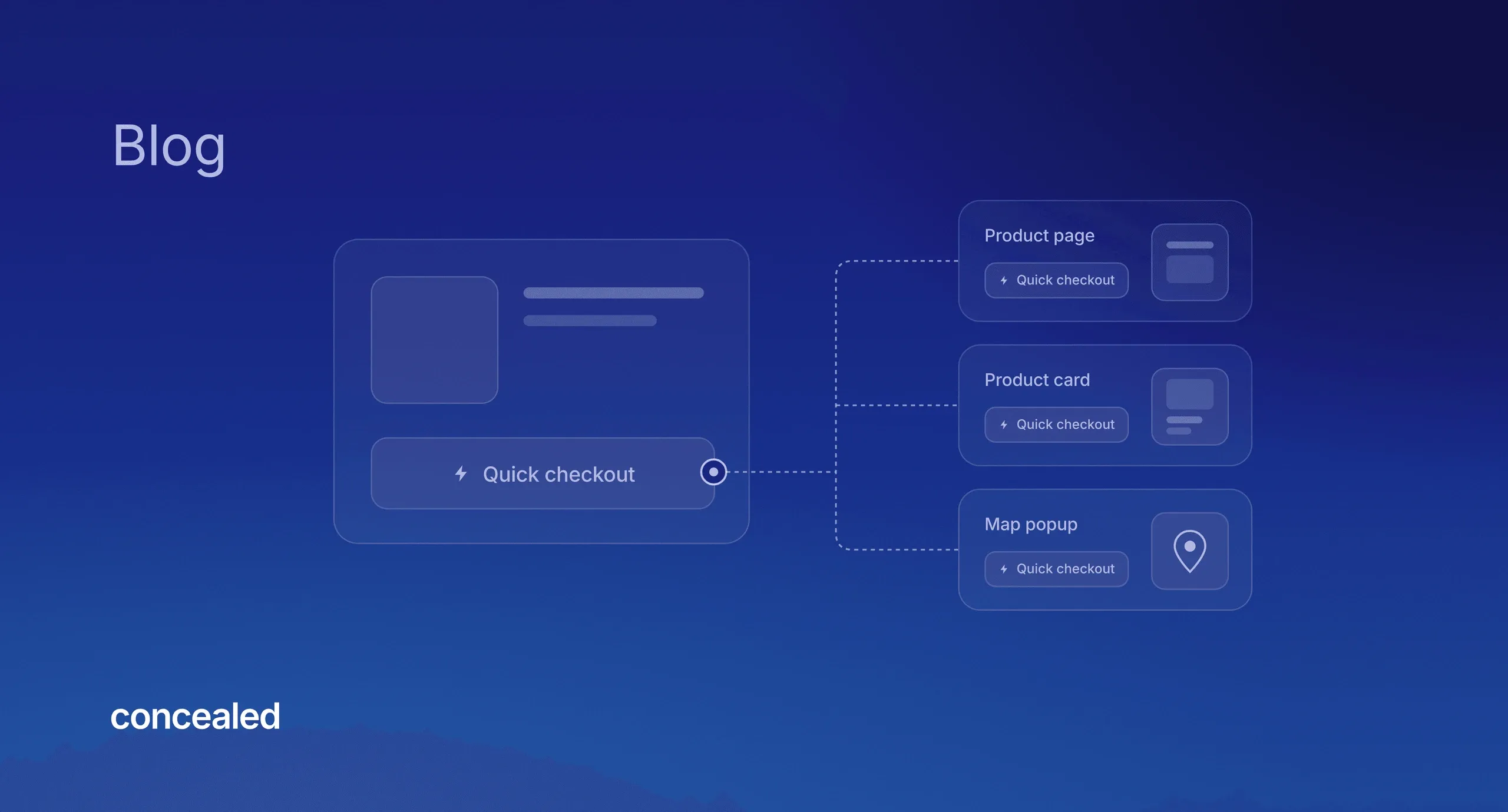
At the end of 2025, the client wanted a quick checkout, a convenient way for a customer to buy a product in one step from wherever they see it, without going through the cart. On a page-based codebase this is the type of request that touches everything because “wherever they see it” means the product page, the catalogue, the bestseller lists, the wishlist, the map popup, everywhere.
We first separated the existing checkout flow into its own component, so that the normal checkout and the new quick one would run the same steps, and the payment module wasn’t even touched. We then wrote one quick checkout button and placed it in the product page (one addition covers three placements), in the product card (which carries it to every list), and in the map popup built almost two years earlier, which only needed the button slotted in. A single modal wrapped the existing flow for the one-step case and is reused in all of these placements.
Why this matters for clients
The practical effect for a client is that estimates tend to stay proportional to the request. A new filter is a filter-sized job and a new way to buy is a checkout-sized job, instead of every change carrying the hidden cost of the pages it’s added to. It’s also what makes our fixed prices possible: we have written elsewhere about why we prefer fixed-price work to hourly billing, and we can only hold a fixed price because changes stay contained. If every request risked a rebuild, we would have no option but to bill by the hour.
These effects are amplified by having the same team designing and developing here, with no hand-off in between. The parts in the design file and the parts in the code have the same names and the same boundaries, so a conversation about changing one of them is the same conversation in both places.
Components do not make every change free, and a product that keeps growing will sometimes need a large one. When we moved the app to a new major version of its framework in 2023, nearly every component had to be touched. What they do is keep those changes rare and, above all, keep the small ones small, so that the budget goes to the product growing rather than to the same ground being rebuilt.
simMarket started in 2020 as a desktop app. The same parts have since carried it into a vendor platform where the creators who sell on the shop manage their products, and into the redesign of the shop itself.
If this sounds good to you, and you want the development of your product planned out so that it never needs a rebuild, let’s talk about your project.
Frequently Asked Questions
What is component-based architecture, in plain terms?
It’s a way of building software as a set of independent parts, each with one job and a small, agreed way of talking to the others, so that a product is assembled from parts instead of written page by page.
Why does code architecture matter for a small business’s software?
Because a small business rarely has the budget for a second version. Most of what software costs is spent after launch, on changes rather than bug fixes, and the architecture decides whether each change costs the size of the request or the size of the product. Well-separated parts also let a small team keep the product moving for years, which is the difference between software that grows with the business and software that gets replaced.
Is building in components slower or more expensive at the start?
Slightly, for the first few weeks, because the first parts take time before there are screens to show. After that, screens are mostly assembled from parts that already exist, so the pace picks up, and every change after launch is cheaper from then on.
How small can a change be after launch?
On simMarket, replacing the catalogue’s infinite scroll with numbered pages in 2026 changed 4 files. Enabling or disabling the installer for each simulator is controlled by one setting that 3 components read. Removing a section from the home screen is 2–5 lines of code.
What happens when the change comes from outside?
Those are the changes that can’t be planned for, and they tend to hit the hidden parts of a product. When Microsoft released a new version of its simulator in November 2024, supporting it meant adding a version to the simulator rules, a second install folder in settings, and a badge and a map filter where products appear. The release was ready on the simulator’s launch day. The work took the weeks before it and the rest of the app didn’t need to know about it.
Does this apply to websites, or only to custom apps?
Both. Our Framer websites are built from reusable components for the same reason, so changing one updates every page that uses it, and the break-even arrives inside the project rather than years later. Sharing the same design system between the simMarket app and shop is the same idea across these two types of products.
How do you decide what becomes a component?
We ask what’s likely to change or to be reused. A decision someone else controls, such as how a simulator expects its files, gets a boundary around it, just like anything used in more than one place. What we avoid is abstracting on the first use, before a second use shows what the part really is.
Is component-based architecture the same as microservices?
No. Microservices split a system into separately deployed services, which brings its own operational cost. Component-based architecture splits the code inside one product into parts with clear boundaries. simMarket is a single application with a single deployment, and the components live inside it.
Written by Francisco Lopes, developer at Concealed — a Framer Expert agency based in Lisbon building fast, scalable websites and custom internal tools for companies.